
Being a parent of 2 doesn’t leave a huge amount of time for personal projects, but as life moves on, tech is moving at break neck speed, so it’s worth finding the time where I can to experience the latest outside of the confines of a corporate environment!
What should I choose then?
If I’m going to carve out personal time, it has to be something fun that I’m passionate about, something I will use and using technology that will make me learn.
Before that was Swrl List 2; and as that’s as feature complete as I want to get it (ie I’m using it and it works just fine thanks), I’m drawn to my other favourite pastime: boardgames!
Bartenders of Corfu – elevator pitch

Over the past few years I’ve been slowly tinkering with a boardgame design of my own called Bartenders of Corfu. Inspired my teen holiday to Corfu with my best mates: Bartenders of Corfu captures the spirit of the bustling evening strip of cheap bars and dubious decisions. In this game, you are all playing the role of bartenders of various classy establishments: selling drinks as fast as you can from limited supplies. To keep in the Corfu party spirit, you may choose to also drink with your patrons, gaining special abilities whilst doing so; just be careful not to get too drunk else you may be whisked off to the nearest hospital!
Digitising and stack choosing
Bartenders exists in prototype physical form, but as my mate Dan lives too far to play it regularly, I want to be able to play test new rules online; which brings us here.
Back to that check list:
- something fun that I’m passionate about ✅
- something I will use ✅
- using technology that will make me learn ⏳
Choices, choices…
There’s A LOT of choice on how to write and deploy something nowadays! Many cloud providers, ways to provision; limited control, full control; at home infra using Raspberry Pi, cloud providers; Infra as code using kubernetes, Helm, Terraform (OpenTofu??) or none of the above. And then we get to the code: Typescript is popular, java/kotlin I’m familiar. Go? Rust? Haven’t done those before, could be interesting!
To avoid analysis paralysis my choice are heavily steered towards:
- Pick one and go for it
- Get it working
- Pivot later
For deployment I wanted to use Kubernetes. As I already had Google Cloud account for Swrl List (using the Firebase stack), I went for GCP and GKE and will use GitHub Actions to run terraform/helm/whatever to provision.
For code, my mate (Dan again) was learning python and didn’t get back into it. He needed a project to get started again… so python it is!
AI? Sure! At home I can access all the AIs; useful as I can switch when they stop being free 👍 As I don’t want to pay for an IDE, I’ve gone with VS Code on my Mac, with Cline for full agentic madness and GitHub Copilot for inline code chat. Images: ChatGPT is pretty good now, see the logo above!
Getting coding
Using FastApi and cline/Co-pilot to get the UI looking ok with a simple API, I ended up with: https://github.com/mrkyle7/bartenders-of-corfu
As I’m using docker, using docker desktop and docker compose watch is a nice experience to code and see it build and update live.
I’m sure there are some enhancements to be made to the Dockerfile, but I’m keen to get it hosted somewhere!
Push it real good
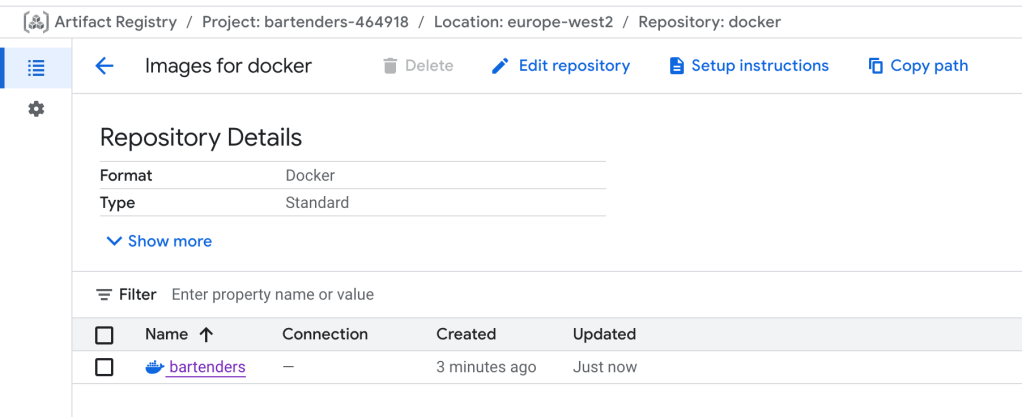
Next was to push this docker image somewhere. Might as well choose Google Artifact Repository, so created one using the UI, resulting in “us-east1-docker.pkg.dev/bartenders-464918/docker-us”, then configured github to access it:
(Maybe these should all be terraform scripts? So many steps, I can always go back and codify later)
gcloud iam workload-identity-pools create "github-pool" \
  --location="global" \
  --display-name="GitHub Actions Pool"
gcloud iam workload-identity-pools providers create-oidc github-provider \
--location="global" \
--workload-identity-pool="github-pool" \
--display-name="GitHub Actions OIDC Provider" \
--attribute-mapping="google.subject=assertion.sub,attribute.repository=assertion.repository" \
--attribute-condition="attribute.repository == 'mrkyle7/bartenders-of-corfu'" \
--issuer-uri="https://token.actions.githubusercontent.com"gcloud iam service-accounts add-iam-policy-binding github-terraform@bartenders-464918.iam.gserviceaccount.com \
--role="roles/iam.workloadIdentityUser" \
--member="principalSet://iam.googleapis.com/projects/987774112216/locations/global/workloadIdentityPools/github-pool/attribute.repository/mrkyle7/bartenders-of-corfu"
gcloud projects add-iam-policy-binding bartenders-464918 \
  --member="serviceAccount:github-terraform@bartenders-464918.iam.gserviceaccount.com" \
  --role="roles/storage.admin"
gcloud artifacts repositories add-iam-policy-binding docker \
--location=us-east1 \
--member="serviceAccount:github-terraform@bartenders-464918.iam.gserviceaccount.com" \
--role="roles/artifactregistry.writer"Then with some GitHub Actions yml all seems to be pushing as expected! Lovely!
GCP: Back to basics
Before hosting this docker image and to familiarise myself with kubernetes on GKE I jumped to the Google Cloud tutorials: https://cloud.google.com/kubernetes-engine/docs/quickstarts/create-cluster-using-terraform.
With some tweaks the guide didn’t mention to get terraform working from local terminal (come on Google, this is terraform 101!):
- Missing step to authentication the local gcloud CLI: gcloud auth application-default login
- Missing project definition in cluster.tf x3
- Even terraform plan didn’t detect it was missing which is odd
in 10 mins I had my example-hello-app-deployment running. How, to how my friend put it, so much config and code to get something so little saying hello 😊
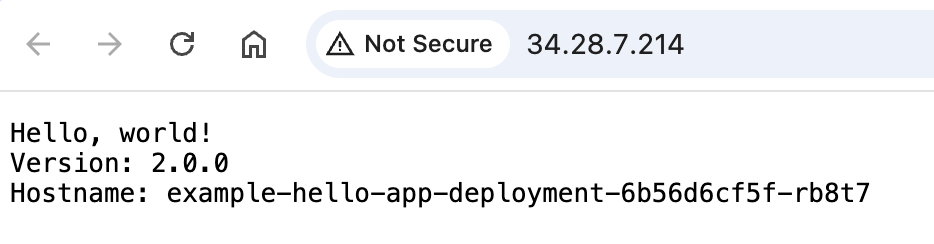
5 mins later, that was destroyed, next step: copying this setup for bartenders!
Holy moly guacamole!
I took a pause at that point, then noticed a 7p bill! This may not seem a lot… but I can only assume was for the few seconds of saying hello in the tutorial! As I was used to Google’s free tier being, well free, the potential of this multiplying to £100s a month made me check the cost calculator with a bit more scrutiny. Whilst a compute engine micro VM is a mere £2.59 a month, using GKE is estimated at £57.38!
Nah mate.
Hello k3s
To keep the kubernetes dream alive without breaking the bank, I found some guides to install k3s onto a micro vm on GCP instead. https://k3s.io/
https://dev.to/jdxlabs/create-your-k3s-lab-on-google-cloud-2pim
https://nimblehq.co/blog/provision-k3s-on-google-cloud-with-terraform-and-k3sup
I wanted to try all this locally first though before spaffing it out to the cloud. K3s comes as a docker image too, and as I already have docker, sounded like a good place to start.
Following: https://dev.to/olymahmud/running-a-kubernetes-cluster-with-k3s-30lo to get k3s running (stopped at single node), I now have:
docker run --privileged --name k3s-server -d \
  -p 6443:6443 -p 80:80 -p 443:443 -p 30800:30800 \
  -v k3s-data:/var/lib/rancher/k3s \
  --hostname k3s-server \
  --network k3s-net \
  rancher/k3s:v1.29.1-k3s1 server \
  --node-name k3s-server
% kubectl get nodes
NAME STATUS ROLES AGE VERSION
k3s-server Ready control-plane,master 11m v1.29.1+k3s1Now I needed a local docker registry to pull from using the same docker network
docker network create k3s-netdocker run -d -p 5000:5000 --network k3s-net --hostname docker-registry --restart=always registry:latest
docker build . -t localhost:5000/bartenders
docker push localhost:5000/bartenders(Nothing is ever easy) https://stackoverflow.com/questions/72369320/why-always-something-is-running-at-port-5000-on-my-mac
With some extra faffing:
docker cp k3s-registries.yaml k3s-server:/etc/rancher/k3s/registries.yaml

#content
mirrors:
  localhost:5000:
    endpoint:
      - "http://docker-registry:5000"
I managed to run kubectl to create a pod and used nodeport to expose on http://localhost:30800/
Nice.
Next up: to the cloud!
Mangling together the terraform from Google Cloud GUI and https://dev.to/jdxlabs/create-your-k3s-lab-on-google-cloud-2pim – I got some working config and spun up a VM!
Side Note: the “Equivalent Code” option on Google console to give you terraform configuration had errors in it – lolz.
To get it running, I ran the local equivalent kubectl commands via SSHing onto the VM… and it was struggling. HARD.
Maybe the VM I have is too puny to run k3s, so I switched from e2-micro to e2-small. I also turned off the SPOT VM option. This may be bad… but GCP pretty much killed the instance immediately, so it wouldn’t work out well for this! Despite the CPUs being the same and the only difference between micro and small being 2GB RAM vs 1GB, kubectl commands were immediately so much faster!
Again, a lot of faffing was required to get the docker secrets working. First I missed adding “imagePullSecrets” to my pod, then I realised “latest” tag wouldn’t work on my image as I fixed a sha tag on push… doh.
FINALLY I got the pod running it’s ALIVE! http://34.23.175.50:30080/
That’ll do for now….
Next steps:
- Use Ngnix to configure 443 for https
- Get a DNS name
- Get a cert using letsencrypt
- Get GitHub Actions to update the image on push
- Actually make the game….
 Daddy Coder